Secondary eSIM Restrictions, Travel Profile Failures, and How to Carrier Unlock Your Smartphone

Apple iPhone 16 Pro
8GB RAM, Apple A18 Pro (3 nm), Grade 5 Titanium • 3582 mAh • 6.3", 1206x2622 pixels, LTPO Super Retina XDR OLED, 120Hz
Modern flagship smartphones boast dual-SIM architecture, allowing users to combine a primary physical SIM card with a digital embedded SIM (eUICC). However, frequent international travelers often encounter a frustrating roadblock at the airport: an error message stating “Cellular Plan Cannot Be Added” or “SIM Not Supported” when scanning a travel QR code. This failure is rarely a defective profile; rather, it is rooted in baseband carrier locks, contractual smartphone financing stipulations, and modem policy engine configurations.
The Technical Architecture: Why Secondary eSIMs Inherit Carrier Locks
A common misconception among consumers is that carrier locking applies strictly to the physical nano-SIM tray. In telecommunications engineering, network locks are enforced at the baseband processor level (the baseband modem firmware, such as Qualcomm Snapdragon X-series or MediaTek Dimensity modems) and authenticated via Mobile Country Code (MCC) and Mobile Network Code (MNC) tuples.
Apple iPhone 16 Plus
8GB RAM, Apple A18 • 4674 mAh • TAC: 35987416
When an operator sells a subsidized device, they provision an activation policy ticket into the operating system and non-volatile modem memory (NVRAM). This lock enforces restriction lists across both SIM slots:
- Physical SIM (Slot 1): Bound to the carrier’s specific MCC/MNC pairs (e.g., 310-410 for AT&T or 208-10 for SFR).
- eUICC / eSIM Chip (Slot 2): Operates under the identical activation policy profile. Even though an eUICC has its own EID (Embedded Identity Document) and distinct modem channel, the operating system kernel prevents provisioning any profile whose carrier certificate (OID) does not match the parent carrier’s whitelist.
Before investing in third-party international connectivity, you should verify whether your device maintains a factory lock status by entering your hardware identifier into an authoritative IMEI Validator. If the device remains tied to an operator profile, any secondary activation will fail instantaneously at the LPA (Local Profile Assistant) handshake stage.
Travel Profile Failures: LPA Errors and Network Handshake Breakdown
When attempting to install international eSIM data plans onto a locked device, the process halts through distinct technical fault codes. Understanding these points of failure helps diagnose whether the issue stems from an active carrier restriction, an expired SM-DP+ session, or an incompatible roaming matrix:
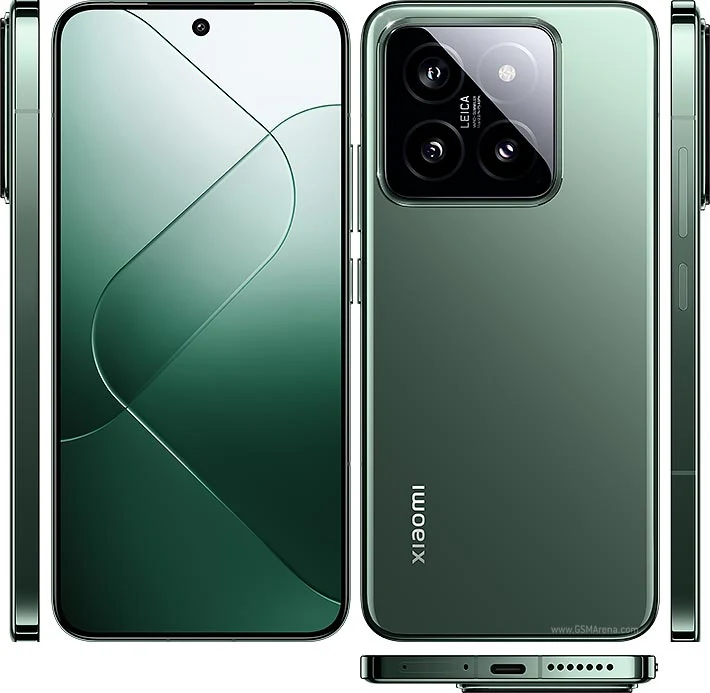
Xiaomi 14
6.36", 1200x2670 pixels • 4610 mAh Batarya • 5G NR Band 20 / n78 Sertifikalı
| Error Manifestation | Root Cause | Engineering Resolution |
|---|---|---|
| SIM Not Supported / Profile Ineligible | OS policy manager blocks LPA from communicating with SM-DP+ server due to non-whitelisted MCC/MNC. | Complete a formal carrier unlock through the host network provider. |
| Subject Code 8.2.6 / Reason 3.8 | GSMA RSP (Remote SIM Provisioning) session timeout or pre-allocated transaction token expired. | Request a QR code regeneration from the travel eSIM vendor. |
| PDP Authentication Failure | APN (Access Point Name) misconfiguration or blocked data roaming roaming payload on secondary node. | Manually configure APN string and toggle “Data Roaming” to ON under secondary cellular settings. |
Financial Analysis: Smartphone Financing vs. Roaming Freedom
Carriers utilize device lock mechanisms as structural collateral against smartphone financing agreements. If an operator sells a $1,200 flagship handset for $0 down over a 36-month bill-credit installment plan, enforcing a baseband lock ensures the hardware cannot migrate freely to competing service providers.
The Mathematical Reality: Locked Roaming vs. Local eSIM
Consider a subscriber traveling abroad for 21 days each year over a 36-month financing cycle:
- Carrier Daily International Pass: $12/day × 21 days = $252 per year. Over a 3-year financing term, total roaming expenditure equals $756.
- Independent Travel eSIM Plan: $15 for 10 GB (30-day validity) = $15 per year. Over 3 years, total data expenditure equals $45.
- Net Opportunity Cost: By remaining locked and unable to utilize non-native eSIM data plans, the user surrenders $711 in avoidable carrier surcharges—negating more than 50% of the initial device subsidy.
You can calculate real-time roaming savings and plan budgets using our specialized Travel eSIM & Roaming Calculator to accurately measure your operational margins before embarking abroad.
Secondary Market Impact: Trade-In Value & Insurance Claims
A carrier lock profoundly diminishes secondary market liquidation liquidity. On average, a factory-unlocked device commands a 15% to 28% higher trade-in value on secondary exchanges compared to a carrier-locked equivalent. Resellers pay premium rates for uninhibited hardware because it avoids potential balance recalls and carrier default blocks.
Furthermore, if you subscribe to third-party mobile device insurance, filing a claim on a locked, contract-bound phone can complicate total-loss replacements. Insurers frequently issue unlocked OEM-grade recertified replacements, which can cause contractual discrepancies with your original carrier’s financing portal if the IMEI changes are not documented correctly.
Step-by-Step Guide: Transitioning to an Unlocked Device
Unlocking your handset allows simultaneous utilization of your domestic primary number alongside local travel data networks. Follow this systematic approach to complete the carrier unlock cleanly:
- Verify Contractual Eligibility: Ensure that your 24- or 36-month equipment installment plan (EIP) is paid to a zero-dollar balance. Devices with active debt or outstanding service fees will be rejected automatically by automated network clearinghouses.
- Confirm Clean Equipment Identity: Prior to requesting an unlock, ensure the modem identity is recognized as a clean IMEI. If an unpaid balance, loss report, or billing glitch has marked the identifier, review its status via the Stolen & Blacklist Checker.
- Submit the Official Unlock Request: Navigate to your carrier’s dedicated device unlock portal. Under FCC regulations (in the United States) and comparable consumer protection codes across the UK and EU, carriers must unlock postpaid devices within two business days once financing terms are fulfilled.
- Apply the Over-The-Air (OTA) Activation Ticket:
- Apple iOS: Connect to Wi-Fi. In Settings > General > About, confirm that “Carrier Lock” changes to “No SIM restrictions”. No physical reset is required.
- Android (Samsung, Pixel): Navigate to Settings > Connections > More Connection Settings > Network Unlock, and tap “Permanent Unlock” to pull the new cryptographic authorization from the OEM server.
Post-Unlock Hardware Validation: RF Bands and Global Frequencies
Achieving an unlocked status does not guarantee universal high-speed connectivity. Cellular transmission requires physical hardware support for target regional radio frequencies (RF). While modern basebands cover wide spectrum ranges, regional hardware SKU variations exist:
- North American Models (e.g., A2848): Heavily weighted toward 5G mmWave (n258, n260, n261) and Band 71 (600 MHz), which are largely unused across Europe and Asia.
- European / Global Models (e.g., A3106): Prioritize Sub-6 GHz FDD/TDD spectrum including LTE Band 20 (800 MHz), Band 28 (700 MHz), and 5G n78 (3.5 GHz C-band).
Before finalizing travel itineraries, verify your device’s specific radio transceivers against local destination operators using our 4G/5G Frequency Compatibility Checker. This ensures your unlocked smartphone receives optimal gigabit downlink rates without falling back onto degraded legacy bands.