Fix PDP Authentication Failure on Travel eSIM: Telecom & Financial Guide

OnePlus 12
• 4500 mAh •
Stepping off an international flight, disabling airplane mode, and being greeted by the alert “Could not activate cellular data network: PDP authentication failure” is a frequent disruption for global travelers. While your device may show solid 4G or 5G signal bars, your IP traffic remains completely blocked. This is not simply a random glitch; it is an explicit rejection handshake between your device's baseband processor and the visited Public Land Mobile Network (VPLMN).
This engineering guide details the root telecom signaling causes behind Packet Data Protocol (PDP) activation errors, explains how APN profiles and roaming agreements interact, and provides a clear diagnostic framework. We also examine how underlying hardware factors—such as an incomplete carrier unlock, unpaid clean IMEI restrictions from smartphone financing, and frequency band misalignments—can trigger persistent PDP authentication failures.
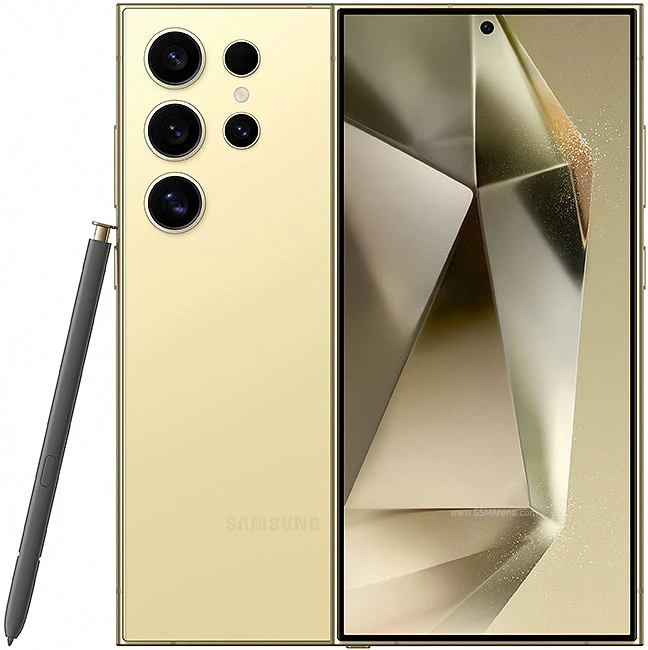
Samsung Galaxy S24 Ultra
12GB RAM, Snapdragon 8 Gen 3 (4 nm), Titanium frame • 5000 mAh • TAC: 35167624
The Core Telecom Architecture: What Is a PDP Context Failure?
To understand the failure, one must understand the connection sequence. When an embedded SIM (eSIM) registers on a cellular tower, it executes two distinct layers of attachment:
- Circuit-Switched / EPS Network Registration: The baseband modem connects to the local Radio Access Network (eNodeB for LTE or gNodeB for 5G) and validates the International Mobile Subscriber Identity (IMSI) with the Home Subscriber Server (HSS) / Unified Data Management (UDM). This provides physical signal bars.
- Packet Data Protocol (PDP) Activation: To transmit IP packets, the User Equipment (UE) sends an
Activate PDP Context Requestto the visited Serving GPRS Support Node (SGSN) or Mobility Management Entity (MME). This request contains the Access Point Name (APN), IP type (IPv4, IPv6, or dual IPv4v6), and authentication credentials (PAP or CHAP).
A PDP authentication failure occurs when the Packet Data Network Gateway (PGW) or Gateway GPRS Support Node (GGSN) rejects the credentials embedded in the APN configuration, or when the visited network's roaming steering policies fail to validate the subscriber's roaming entitlement profile. For users relying on third-party eSIM data plans, this is frequently caused by stale Home Location Register (HLR) caches, wrong authentication protocols, or misrouted S8/S5 roaming tunnels.
Systematic Troubleshooting Steps to Clear PDP Authentication Errors
Follow this targeted sequence to diagnose and resolve the error directly on iOS or Android devices:

Apple iPhone 16 Pro Max
6.9", 1320x2868 pixels • 4685 mAh Batarya • 5G NR Band 20 / n78 Sertifikalı
1. Rectify Manual APN and Authentication Credentials
Travel eSIM providers lease Mobile Virtual Network Operator (MVNO) infrastructure. Operating systems often fail to automatically push the correct Over-The-Air (OTA) configuration. When the device defaults to generic carrier APNs, PDP context fails instantly.
- iOS: Go to Settings > Cellular (or Mobile Data) > select your Travel eSIM > Cellular Data Network. Check the APN, Username, and Password fields under Cellular Data and Personal Hotspot. Enter the exact string provided by your eSIM issuer (e.g.,
globaldata,truphone.net, ordrei.at). Ensure no trailing spaces exist. - Android: Go to Settings > Network & Internet > SIMs > select Travel eSIM > Access Point Names. Tap the three dots to create or edit an APN. Verify that APN Type is set to
default,supland ensure the Authentication Type matches the carrier requirement (typicallyPAPorCHAP).
2. Force Manual Network Selection (PLMN Re-registration)
Travel eSIMs utilize multi-IMSI architectures with commercial agreements across several local operators in each destination country. If your phone attaches automatically to an operator that lacks a full General Packet Radio Service (GPRS) roaming agreement with your provider, PDP activation is refused at the PGW layer.
Disable Automatic Network Selection in your device settings. Allow your modem to scan local radio bands (this can take up to 90 seconds). Manually cycle through available partner networks (e.g., Orange, Vodafone, Telefónica) until one accepts the PDP context handshake.
3. Toggle Data Roaming and Cycle the Radio State
Because the eSIM profile is registered under an international MCC/MNC (Mobile Country Code / Mobile Network Code), the visited network is always considered roaming. If the local Data Roaming toggle is switched off, the operating system kernel suppresses the secondary PDP context request. Turn “Data Roaming” on, toggle Airplane Mode on for 15 seconds, and turn it off to re-initiate the EPS attach process.
Technical Comparison: Roaming Failures & Root Causes
| Error State | Signaling Point | Root Cause | Resolution Strategy |
|---|---|---|---|
| PDP Auth Failure | SGSN / PGW Interface | APN credentials rejected or PAP/CHAP protocol mismatch | Manually update APN strings and clear extraneous trailing spaces |
| PDP Context Denied | HSS / Home HLR | Data allowance exhausted or profile provisioning suspended | Check billing portal; re-top-up data package via local Wi-Fi |
| Roaming Restriction (Cause #14) | VPLMN Mobility Mgmt | No active S8/S5 peering with currently selected radio tower | Disable Automatic Carrier Selection; manually attach to alternative PLMN |
| Baseband Attach Failure | Baseband <-> Radio | Carrier lock, finance block, or missing LTE/5G bands | Verify hardware compatibility and clean IMEI / unlock status |
Hardware, Financing, and Financial Vulnerabilities in Roaming
A recurring issue for travelers is discovering that what appears to be a basic PDP authentication bug is actually a hardware or financial restriction tied to their smartphone.
Carrier Unlock Status and Smartphone Financing Restrictions
Devices under ongoing smartphone financing agreements or carrier billing programs often carry embedded SIM locks. If your device has not undergone an authorized carrier unlock, it may permit an international eSIM profile to be installed and generate bars, yet the internal baseband policy manager will refuse to route cellular data over an unapproved network. In these cases, the OS surfaces a generic PDP error rather than identifying the lock. Furthermore, devices purchased on secondary marketplaces with unpaid financial obligations risk blacklisting. Ensure your device carries a verified clean IMEI before relying on international travel profiles.
Hardware Band Compatibility Analysis
Even when unlocked, geographical hardware variants influence performance. For example, a North American domestic device optimized for LTE Bands 2, 4, 12, and 66 may lack support for regional low-frequency coverage bands (e.g., Band 20 in Western Europe or Band 28 in Asia-Pacific). When a smartphone is forced to register on a weak, crowded secondary band, edge towers frequently drop PDP context packets during cell handovers.
Before traveling, cross-reference your specific model number using our 4G/5G Frequency Compatibility Checker to confirm modem interoperability with overseas host operators.
Financial Analysis: Travel eSIM vs. Traditional Carrier Roaming
Resolving PDP configuration issues delivers measurable financial benefits. Consider a corporate traveler taking a 14-day trip across the European Union:
Scenario: 14-Day Trip (10 GB Expected Consumption)
- Option A (Domestic Carrier Daily Pass): $10.00/day × 14 days = $140.00 (Subject to domestic throttling after 512 MB/day).
- Option B (International Travel eSIM): 10 GB fixed regional bundle = $18.00 flat.
- Direct Cost Savings:
$140.00 - $18.00 = $122.00(87.1% cost reduction).
However, should the traveler encounter a PDP authentication failure and abandon the eSIM in favor of standard pay-as-you-go international data at unmetered rates ($2.05/MB), consuming just 300 MB for emergency navigation can result in a surprising $615.00 bill. Troubleshooting your APN profile takes less than three minutes and protects you from steep roaming fees.
Risk Advisory: Mobile Device Insurance and Network Resets
When troubleshooting persistent PDP errors, many online forums suggest executing a full “Reset Network Settings” or performing an unverified baseband flash. Travelers should exercise caution:
- Executing a network reset deletes all stored Wi-Fi certificates, corporate VPN tokens, and paired Bluetooth keys, which can lock you out of hotel access portals and two-factor corporate authentication systems.
- Flashing unofficial firmware abroad to bypass carrier locks will void third-party mobile device insurance policies and drastically reduce your hardware's secondary trade-in value. Keep modifications to official OS-level APN adjustments and network selection toggles.
By systematically verifying APN inputs, enforcing manual PLMN selection, confirming clean device ownership, and reviewing frequency compatibility, travelers can resolve PDP authentication errors and maintain secure, cost-effective connectivity worldwide.
Frequently Asked Questions
What does 'Could not activate cellular data network: PDP authentication failure' mean? ▼
It means your device connected to the cell tower radio signal, but the core network rejected your request to open an internet session. This is typically due to incorrect APN settings, an expired data package, or an incompatible roaming profile.
How do I fix PDP authentication failure on an iPhone? ▼
Navigate to Settings > Cellular > select your Travel eSIM > Cellular Data Network. Manually verify that the APN, Username, and Password match the instructions from your eSIM provider, making sure there are no accidental spaces. Then toggle Airplane Mode on and off.
Can a carrier-locked phone cause PDP authentication errors on travel eSIMs? ▼
Yes. If your phone is locked under an active carrier contract or smartphone financing program, the device may allow profile installation and show signal bars, but the internal security policy will reject third-party data packet authentication.
Does resetting network settings fix PDP authentication failure? ▼
Resetting network settings can resolve corrupted internal baseband caches, but it also erases all saved Wi-Fi networks and VPN settings. It is recommended to first check the APN configuration and try manual network selection before resetting.